Open Design is here — a free Claude Design alternative I actually tried
Open-source, local-first, agent-native design. I wired it into Cursor, pointed it at Color Books AI with intentionally short prompts, and the mockups came back better than they had any right to.
Read time: ~11 minutes
Claude Design made a lot of builders jealous: discover the brief, lock a direction, stream the artifact, critique, deliver — all inside Anthropic's stack. Open Design is the open-source answer that just showed up in my feed: free to run, local-first on macOS and Windows, and wired so the coding agent you already use becomes the design engine.
What Open Design actually is
Open Design is not "another Figma clone with a chat box." Per the project README, it is:
- The open-source Claude Design alternative — same agent-native loop (brief → direction → artifact → critique → deliver), but as an open filesystem of skills, templates, design systems, and plugins
- Local-first desktop for macOS and Windows (with Docker / browser paths if you prefer containers)
- Artifact-first — web / desktop / mobile prototypes, live dashboards, decks, images, video / HyperFrames, with HTML · PDF · PPTX · MP4 export
- Agent-connected — your CLI is the design engine: Claude Code, Codex, Cursor, OpenCode, Copilot, Antigravity, and a long list of others
- Brand-contract driven — renders read an active
DESIGN.md(and related design-system packages) so outputs stay on-brand instead of random pretty pixels
They also pitch it as a Figma alternative for the agent era: instead of only pushing pixels on a canvas, you get real CSS, fonts, and components already shaped by that brand contract — runnable inside the agent on your laptop.
That last bit is why vibe coders should care. If your daily loop already lives in Cursor (or Claude Code / Codex), Open Design is trying to meet you there — not force a second closed studio.
How it stacks up
| Tool | Model | Best for | Catch |
|---|---|---|---|
| Open Design | Open-source · local + BYOK / Cloud | Agent-native prototypes you can export as real files | You bring (or buy) model access; desktop / Docker setup |
| Claude Design | Closed · Anthropic stack | Polished Claude-native design loop | Not open; locked to that ecosystem |
| Figma | Canvas · collab design | Teams, systems, pixel craft, handoff | Not an agent studio by default |
| Google Stitch | Free Google Labs design | Fast web/mobile mockups + mood boards from prompts | Free tier may not last forever |
Stitch remains a strong sibling free tool: generate layouts, then export toward AI Studio, Figma, Netlify, Bolt, Lovable, and more. If you have not tried it, do — totally free of charge today in Google Labs, and we do not know until when.
Why I tried it on Color Books AI
My mother-in-law is a big fan of coloring books in every form — paper, books, mobile, tablet. It helps her switch off and stay creative, which is great for the brain. That pushed me to pull an old project off the shelf: Color Books AI, an AI-powered coloring book app (also listed as a sponsored tool on our Tools page).
I wanted a real product-shaped test — not a generic "landing page for a SaaS" demo. Coloring apps need calm UI, clear nav, and screens that feel finishable. Perfect stress test for short prompts.
How I connected Open Design to Cursor (and a git repo)
I used Cursor as the agent IDE. High-level path — no private repo trees, no secrets, no env dumps:
- Get Open Design running — clone the fork above (or upstream), follow the project quickstart (desktop build or Docker). Confirm the app opens and you can pick a skill / design system.
- Point it at a real codebase — open or attach the project you care about (in my case, Color Books AI). Treat this like any other agent workspace: only give it the context it needs. Do not paste API keys, tokens, or production configs into the chat.
- Wire MCP into Cursor — once the Open Design CLI is on your
PATH, install the Cursor connector so the agent can call OD tools from inside the IDE:
od mcp install cursorDry-run first if you want to preview the config change:
od mcp install cursor --printOther agents use the same pattern — for example od mcp install claude, od mcp install codex, or od mcp install antigravity (Antigravity is the Google CLI path to prefer over the retired Gemini CLI naming).
- Optional brand contract — if you have (or create) a
DESIGN.md, Open Design can treat it as the brand contract for renders. Keep it high-level: colors, type, tone, spacing. Skip anything that would leak product secrets. - Generate → preview → export — ask for mobile prototypes, iterate in the Studio preview, then export HTML (or PDF / PPTX / MP4 depending on artifact type). From there you can hand screens into Cursor / v0 / your usual build path.
The prompts I used (intentionally short)
I deliberately kept briefs thin — no long PRD, no dumped file trees. Roughly:
Mobile coloring screen for a botanical coloring book app.
Calm, modern, light UI. Show a half-colored flower page,
color palette, and bottom tab nav (Home, Library, Color, Daily, Profile).Settings / profile screen for the same coloring app.
Account email + subscription status, simple preferences
(haptics, auto-save, appearance), support links. Match the nav.Daily challenge screen: one botanical page to finish today.
Short instruction, Continue + Skip actions, same bottom nav.That was enough. Open Design returned coherent screens with a shared botanical vibe and nav that already feels product-shaped — which is the point of an agent-native studio: short intent → shippable mockups.
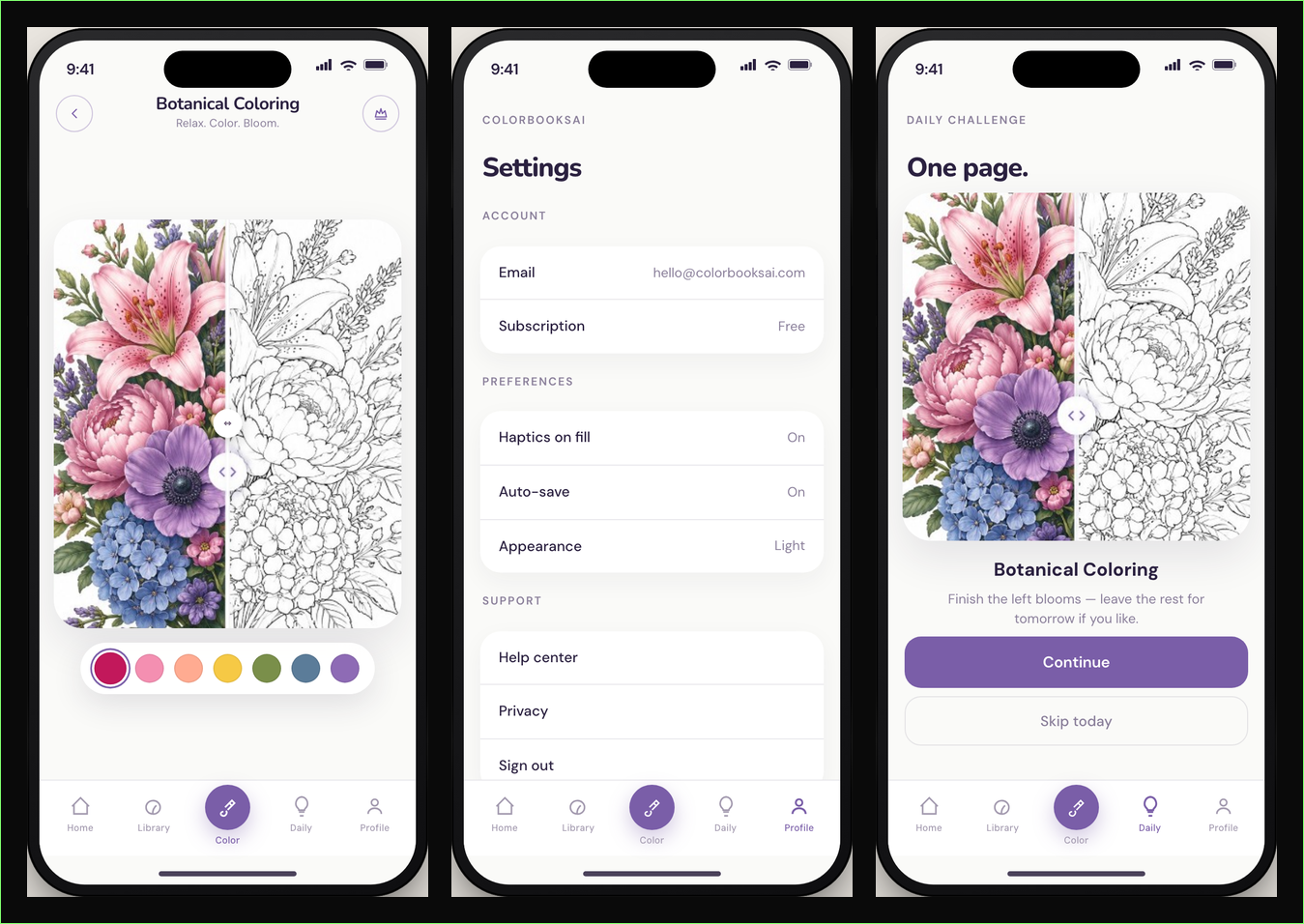
Generated by Open Design from short prompts — coloring, profile/settings, and daily challenge screens.
Also free: Google Stitch in Google Labs
Open Design is not the only free design experiment worth your weekend. Google Stitch in Google Labs lets you design web and mobile UIs with a few prompts, spit out mood cards and mockups, then export into the builders you already use. Strong recommendation while it stays free.
What do you think?
Are you impressed by Open Design's output, or will you stay with Claude Design / Figma for the serious work? Hit reply on a newsletter, or say hi — curious where the agent-design loop actually sticks for vibe coders.
If you ship the UI next, Cursor is still my default agent IDE, and v0 is a solid prompt→React lane when you want code fast.
Sources: kondasviktor/open-design (fork of nexu-io/open-design) README / quickstart; Claude Design product page.
Disclosure: Color Books AI is a sponsored listing on our Tools page. Cursor and v0 links above are referral/affiliate links. Stitch, Bolt, Lovable, Claude, and Codex links are standard catalog URLs with no referral params unless marked on /tools.
Questions? Get in touch — or subscribe for the next AI news post.